24x7 Customer Support
24x7 Customer Support

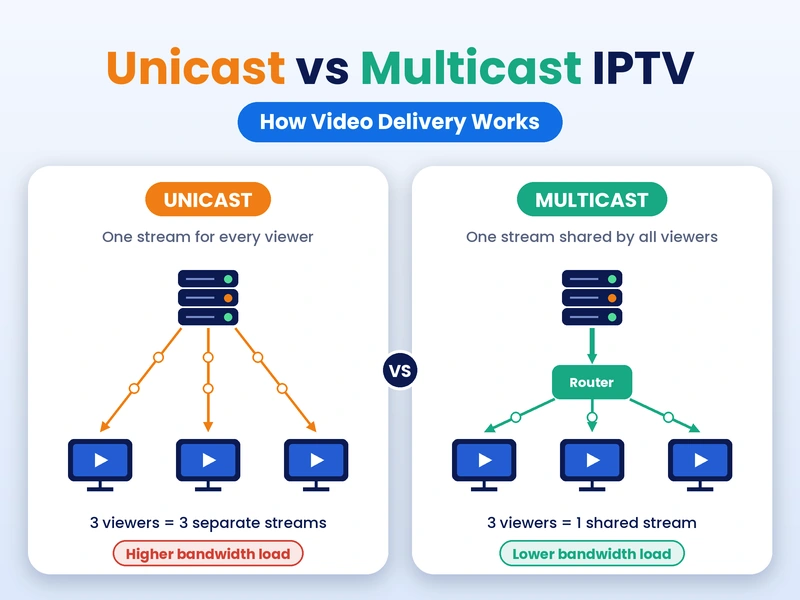
You press play on a live match, and it shows up on your TV in seconds. Have you ever thought about how that happens? The video is cut into small bits. These bits are sent through the internet and put together again on your screen. This is done with IPTV unicast and multicast.
IPTV means TV is watched through the internet. No cable or dish is needed. The channels are changed into data, and the data is sent to your home. This can be done in two ways. One way is called unicast, and the other way is called multicast. Both are used a lot today.
Unicast is like a phone call. One person is called by one caller, and no one else is let in. Multicast is like a radio. One signal is sent out, and many people can listen to it together. Once this is understood, the rest of the topic becomes very easy.
In unicast, one stream is made for each person. When a channel is clicked by you, a request is sent to the server. Then a copy of the video is sent to your device only. If ten people are watching the same channel, ten copies are made and sent. Each copy is used by one person only.
Because each stream belongs to one person, pause and rewind are easily done. Your video can be stopped without other people being touched. Because of this, unicast is used by most apps. It is also used in many IPTV USA services. It runs on normal home internet, so nothing special is needed.
There is a problem, though. When more people are added, more streams are needed. More streams mean more load on the server. If a big match is watched by thousands of people, the video may slow down. More servers are often added to stop this. Good planning is also needed.
Here are the main things about unicast:
In multicast, only one stream is sent out for a channel. That stream is shared by all the people who want it. The video is copied by the network only when it is needed. So the same data is not sent again and again. A lot of space is saved on the network.
People are put into groups, and one group is made for each channel. When a channel is changed, a message is sent to join a new group. The old group is left. A tool called IGMP is used for this. It is mostly used in closed networks, not on the open internet.
Multicast works best in closed networks. A hotel, a school, or a phone company’s own system is a good example. On the open internet, it is not allowed by most routers. Because of this, it is rarely used to send video to homes. This limit is important and should be remembered.
A table is made below to show the difference. It shows how both ways are mostly used in IPTV. Some companies use a mix of both, so this is only a general idea. It is not a rule for every company. Each row can be read one by one.
| Point | Unicast | Multicast |
| Streams sent | One for each person | One shared by many |
| Data use | High when people are added | Low and steady |
| Works on open internet | Yes | Rarely |
| Pause and rewind | Easy | Not easy |
| Server load | Grows with people | Stays small |
| Best for | Apps and on-demand videos | Live TV in closed networks |
Here is a small example. Imagine one cricket match is watched by 1,000 people. With unicast, 1,000 streams are sent out. With multicast, only one stream is sent, and it is shared by all. That is a big gap in data use. This is why big networks like multicast for live shows.
Unicast is used in apps on phones, smart TVs, and sticks. Shows that were missed and movies on demand are also run by it. Since it works on any home internet, it is picked by services that reach people all over the country. That includes viewers in the USA. This is why it is seen so often.
Multicast is mostly used by phone and cable-like companies. A small box is put in the home, and the whole path is handled by the company. Live channels are sent to thousands of homes with a small load. It is a good way when the same channel is watched by many people.
Many companies use both ways. Live channels may be sent by multicast inside the network. On-demand videos are sent by unicast. At times, the video is changed to unicast at the end so it can be seen on a phone. A good balance of cost and quality is given by this mix.
This topic may sound hard, but it matters to normal people. How smooth your video is, how much a company spends, and how many people can watch together are all affected by it. When the basics are known, better choices can be made while a service is being picked.
A viewer never sees the word multicast on the screen. What is noticed is how fast a channel opens, if the picture stops, and how clear it looks. These things are changed by the sending way, your internet speed, and how strong the servers are. Nothing is decided by only one thing.
With unicast, your own speed matters a lot. If your internet is slow, the stream is slowed down and buffering is seen. About 8 to 10 Mbps is advised for HD, and about 25 Mbps is advised for 4K. Wi-Fi can cause trouble too, so a wire is often better.
Buffering is a very common problem in IPTV. It happens when data comes slower than it is played. A small bit of video is kept ready by your device. When that bit is used up, the picture is stopped. The cause may be your network, the server, or both. It takes some time to find the cause.
In unicast, buffering can be caused by a busy server when too many people join at once. In multicast, small glitches can be caused by lost data, because a missed piece is not always sent again. These problems can be lowered by good planning, strong servers, and a steady home network.
Some easy steps that can help lower buffering at home:
The sending way is only one part. The channel list, device support, and help from the team are important too. Many people start with an IPTV free trial. The stream can be tested at home before money is paid. How the service works at busy times is shown by a trial.
The price should be checked too. IPTV subscription plans are usually sold as monthly, three-month, and yearly plans. Longer plans are often cheaper for each month. Before a plan is taken, the number of devices allowed at the same time should be checked. This number is different for each provider and is easy to miss.
The area should be looked at too. A provider made for IPTV USA viewers will often have servers closer to American homes, and that helps video load faster. Plans and trial details are explained there.
One myth is that multicast is always better. It saves data, but it cannot be used everywhere. Another myth is that unicast is always slow. This is not true. With strong servers, unicast can be smooth for a very large crowd. Picture quality is also affected by bitrate and your own internet.
IPTV unicast and multicast are two ways of sending the same video. In unicast, one stream is given to each person. In multicast, one stream is shared by many people, and data is saved. Both are used in IPTV, and many services use them together to get a better result.
Knowing this makes it easier to see why a stream works well or fails. When a service is picked, it should be tested, the plan details should be read, and busy hours should be checked. The IPTV service page above can be visited to see how plans and trials are shown.