24x7 Customer Support
24x7 Customer Support

Choosing an IPTV subscription includes a lot more than selecting channels and subscription prices. Your Internet connection is equally important for determining how smoothly you will be able to watch live television, movies and other content through your device. A good IPTV subscription can face issues related to buffering due to your lack of sufficient Internet bandwidth.
Learning about IPTV bandwidth will enable you to make the right decision while choosing your Internet subscription and setting up a good home network setup. If you watch Indian regional channels, live sports, movies or any other kind of international entertainment, understanding how much speed you need is very important.
In this guide, we have covered everything from learning about IPTV bandwidth to finding out what causes buffering. We have covered how to choose the best Internet speed for IPTV streaming in USA.
The definition of IPTV bandwidth is the amount of internet data that your network can transfer within a certain timeframe. It determines how many bits of data your connection can receive through your IPTV streaming device while you are watching TV online or on-demand.
Typically, the bandwidth is calculated in Mbps (megabits per second). The larger available bandwidth, the more data your connection can transfer at one time, which is especially important when streaming video with high resolution or using a number of devices at once.
For instance, streaming HD channels consume less data than streaming the same channel in 4K quality. In case if a number of people from your family watch different TV programmes, you will need an adequate amount of available bandwidth for such activity. There are other factors affecting IPTV quality besides bandwidth.
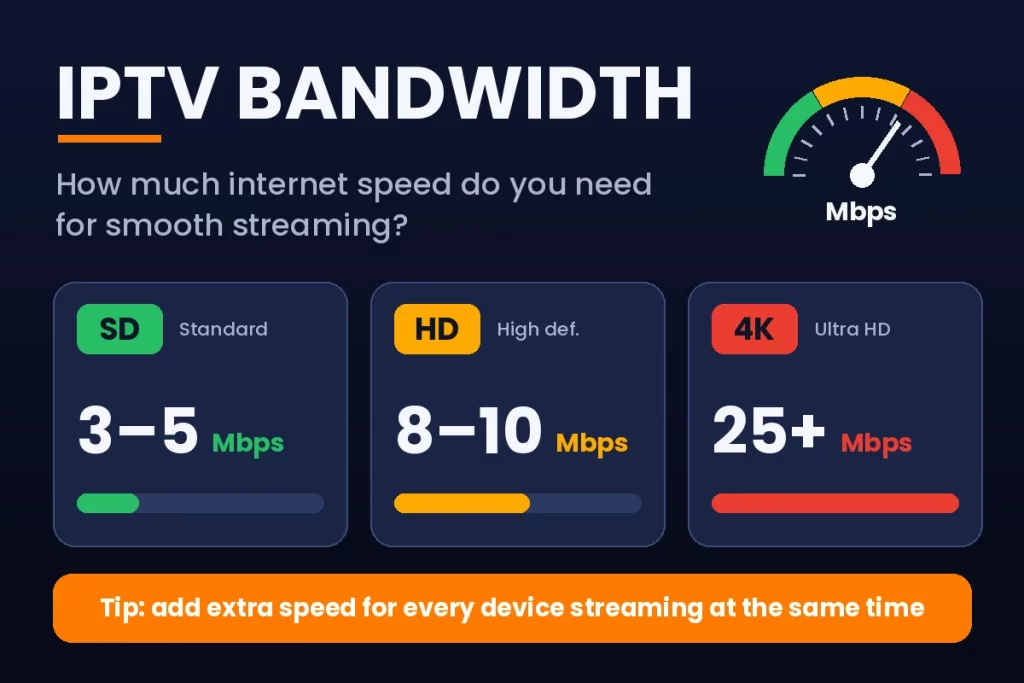
The speed of your Internet connection depends largely on the quality of the video and the number of devices that you wish to stream simultaneously. The numbers provided below are merely indicative and do not represent an absolute necessity for every IPTV service provider.
| Streaming quality | Suggested download speed |
| SD (Standard Definition) | 3–5 Mbps |
| HD (720p) | 5–10 Mbps |
| Full HD (1080p) | 10–15 Mbps |
| 4K Ultra HD | 25 Mbps or higher |
Video resolution is one of the most important factors that influence bandwidth usage. High-resolution video has a lot of visual information and, thus, needs a high data transfer speed.
While standard definition videos require less bandwidth compared to HD and Full HD streams, 4K videos demand a greater amount of data, especially when the stream has a high bitrate.
Your household’s internet usage will be very important when determining your IPTV bandwidth. While some internet connections are good enough to watch TV on one device, they may not be adequate for several devices viewing different channels simultaneously.
This means that when selecting the internet plan, you need to think about how many devices will use the internet at any one time. You need to know how much bandwidth each device needs. Other activities that compete for the same bandwidth include gaming and even video calling.
It is not necessary that with high-speed broadband, your Wi-Fi will always work in a good way. Interference and congestion can cause hindrance in the signal strength which reaches your streaming box.
The farther away your TV is from the router, the chances of buffer increase despite the speed of the internet package. You need to place your router in a better place or use Ethernet to get better connectivity.
The Internet performance level may vary depending on the time of the day. In case of peak hours, several devices and users of the network can compete for available bandwidth.
Such factors may influence your streaming quality especially if your internet subscription allows limited speed or if your Wi-Fi network is overcrowded.
In case you experience IPTV buffering in the evening, conduct several speed tests in different periods of time. Thus, you will be able to understand what causes this problem.
Your device for streaming can also impact your viewing. Obsolete hardware, software problems, and lack of memory and software updates can impact the streaming process.
Ensure that your device fulfills the compatibility requirements of the provider. Update the software on your device as well as the streaming software, if needed. An efficient internet connection combined with a compatible device ensures a better IPTV experience.
An IPTV Free Trial service can assist in evaluating the way the service works on your internet connection and devices before subscribing to the service for a more extended period.
Instead of looking at a service based on the features advertised, test the practical aspects of streaming through the trial period.
Firstly, try watching the channels that you usually watch. Try different types of content as well as videos available. Check the process of loading the channels, playback quality, and the process of changing between different programs.
Another thing to do is to test the service at times when there will be peak usage. If you usually watch television in the evening, this is the good time to do so.
A trial can assist in checking whether you have any compatibility problems with the service but keep in mind that a short period of testing cannot provide you with 100% of accuracy.
The selection of the right IPTV subscription plans goes beyond just opting for a subscription period or even comparing prices. One must consider the way in which one plans to use the service.
If one watches television through one device in HD, then internet needs could be modest. But if there are many devices or 4K streaming is preferred, then one must prepare for more internet bandwidth.
Prior to purchasing a subscription plan, one must check the number of devices that can connect to the service and whether there is a provision for high streaming resolutions and the devices that support this service. It would be wrong to assume that a multi-device subscription means that the internet in one’s home will support the streaming from all devices.
On the Tashan TV website, information about different subscription periods and devices for streaming are available. The website promotes its HD/4K content, live television and entertainment services.
An efficient internet connection forms a key aspect of using IPTV, particularly when it comes to live TV broadcasts and movies in HD and 4K.
Tashan TV offers their IPTV service to users from the USA and Canada, with Indian channels and international channels categories being offered by the site. The IPTV channel guide features shows in languages such as Hindi, Punjabi, Bengali, Gujarati, Tamil, Telugu, Malayalam, Kannada and Marathi.
Moreover, Tashan TV’s service page features a compatibility claim to various devices including Smart TVs, smartphones, tablets, computers and IPTV set-top boxes. Based on your viewing preferences, you can view the subscription packages offered and select a suitable one.
Prior to purchasing the service, it is advisable that you measure your internet connection speeds and check for device compatibility as well as package details. In case a trial offer is available, you can use the trial period to test the IPTV service on your connection.
The bandwidth requirement varies based on the quality of video to be streamed. A good rough estimate is that 5-10 Mbps can work for HD streaming, whereas 4K streaming requires at least 25 Mbps.
A 25 Mbps connection will be enough to watch a single stream in 4K format when you have ideal network conditions. Nevertheless, several gadgets and downloading may raise your bandwidth usage.
Buffering may occur due to interference on the Wi-Fi connection, network congestion, high latency, performance issues of the device being used, or even due to issues on the streaming server. Test your connection next to the TV and see if you have any issues with other programs.
Yes. 4K video usually needs higher bandwidth compared to HD because it has more data. A stable internet link that has 25 Mbps per stream of 4K would be a good start.
Yes, provided that your plan supports the necessary simultaneous connections, and that your internet connection has sufficient bandwidth. All streams will add up to your household’s total consumption.
Yes, if the provider provides a free trial for IPTV, then you can check how well the channels play on your internet and hardware before buying a subscription.